Watches / A closer look
How to Set the Day and Date on a Seiko 4R36 or NH36 Watch
Get the calendar right by establishing morning and evening first.

Start here
For the 4R36, avoid day/date quick-setting while the watch indicates 9 p.m.–4 a.m. Establish a daytime position with the time-setting hands, quick-set the previous day and date, then advance through midnight to today and set the actual time. Confirm your exact NH36 watch instructions before applying the same workflow.
As an Amazon Associate, we earn from qualifying purchases. How our links work ↗
Check the movement and the kind of crown
This tutorial covers three-hand day-date watches using Seiko 4R36 or TMI NH36 movements. It is not a universal method for every Seiko, GMT watch, perpetual calendar or quartz model. Identify the watch reference and use its own manual. The NH36 versus 4R36 explanation helps with the naming, but similar family names do not replace model instructions.
Look up whether the crown screws down. An ordinary push-pull crown can be drawn out to its setting positions. A screw-down crown must first be released from its threads. “Normal position” in the diagram means the operating position once an applicable screw-down crown has been unlocked; it does not mean trying to rotate a locked crown.
Work with a dry watch on a stable surface. Pull gently and feel for the clicks. If the crown will not release normally, or its behavior does not match the manual, pause and ask the seller. Force is not a way to find a missing setting position.
First, move outside the calendar quickset window
Seiko's 4R36 instructions prohibit setting the date or day through quickset between 9 p.m. and 4 a.m. TMI's NH3 technical guide also warns against date setting in that interval. Check the finished NH36 watch's manual for its day/date instructions. Seiko setting instructions; TMI guide, operation page 18.
The relevant time is the time represented by the watch's mechanism, not the time on your phone. If your phone shows breakfast time but the watch is internally approaching midnight, its calendar can already be engaged. A stopped watch creates the same uncertainty: a displayed 10 o'clock does not tell you whether it represents morning or evening.
A practical preparation is to use the second click, which sets the hands, and move the time forward through a date change. That change identifies the midnight part of the cycle. Continue forward to about 6 a.m. Now you have an identified daytime position outside the stated quickset interval. This preparation uses hand-setting, not calendar quickset.
Know what each crown position does
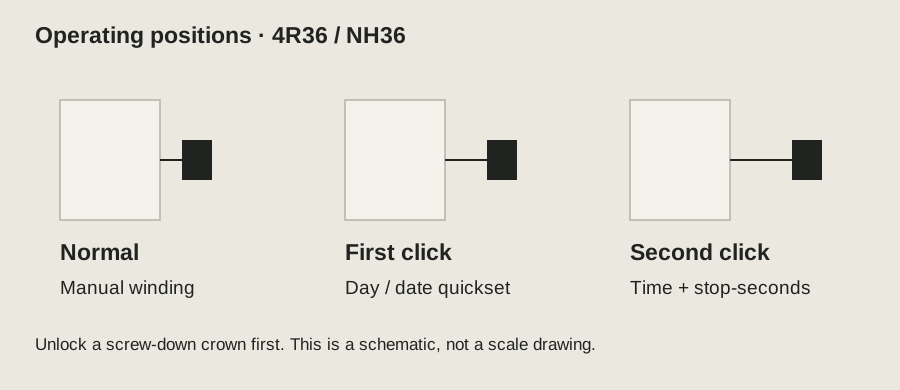
For these movements, the pushed-in operating position is used for manual winding; the first click is for calendar correction; the second click is for time setting and stops the seconds hand. The finished watch may add a screw-down locking action around those positions. Source: TMI NH36 operation and specification diagrams.
At the first click, Seiko describes counterclockwise crown rotation for the date and clockwise for the weekday. TMI describes left rotation for date and right rotation for NH36 day. Interpret rotation while looking at the crown end, and verify against your own illustrated manual. Start gently: do not continue if the display fails to respond normally.
Keep the three jobs separate. Winding supplies energy. Quickset changes the calendar independently. Time-setting advances the hands and the calendar's daily cycle together. Confusing quickset with hand-setting is why a short instruction such as “turn it until the date changes” can be unhelpful without identifying the crown position.
Your calendar-setting checklist
Use these checks alongside the detailed steps. Checkmarks last only for this open page.
Download checklist · TXTUse the previous-day method
- Prepare the watch. Make sure it is running according to its winding instructions, release a screw-down crown if fitted, and establish about 6 a.m. using the hands as described above.
- Use the first click. Correct the date to yesterday's number and the weekday to yesterday, selecting your preferred language if the day wheel is bilingual.
- Move to the second click. Advance the hands forward until the calendar moves into today's date. You have crossed midnight into today's morning.
- Continue to the actual time. For an afternoon time, pass 12 noon before stopping at the desired hour. Do not confuse 7 a.m. with 7 p.m.
- Finish normally. Return the crown fully to its operating position, then lock it if your watch uses a screw-down crown. Check that the seconds hand resumes.
Here is a worked scheduling example, not a test: suppose today is Thursday the 15th at 7:20 p.m. At a known daytime position, quick-set Wednesday the 14th. Advance through midnight into Thursday the 15th, then through noon to 7:20 p.m. The important part is the noon passage, not simply aligning the hour hand with seven.
Near midnight, the weekday need not settle at exactly the same moment as the date. Allow the normal transition to complete rather than trying to force a partially changing display with quickset.
If the date changes at noon, check AM/PM
A calendar change around lunchtime often means the watch was set twelve hours out. The hands look correct twice each day, so this mistake can survive a quick visual check. Establish midnight through the date change again, then advance to the correct morning or afternoon time. Do not try to fix the underlying cycle by changing only the weekday.
| What you see | What to check first |
|---|---|
| Date changes near noon | Internal AM/PM phase; set the hands through a known midnight. |
| Another language appears during the night | Whether the bilingual wheel is still transitioning; observe after completion. |
| “31” after a 30-day month | Normal manual correction to the first, outside the quickset window. |
| No normal change, repeated skipping, or crown resistance | Record the symptom and contact the watch's service provider. |
Seiko states that its 4R36 date changes around midnight and the weekday around 4 a.m.; a bilingual wheel may show the other language during that transition. Do not demand that both windows snap together at precisely 00:00. Source: Seiko calendar instructions.
Handle month ends and stopped watches deliberately
A standard day-date calendar does not know which month you are in. After February or a 30-day month, correct the date manually at a safe indicated time. The weekday should already have advanced naturally; avoid changing it again unless it is actually wrong.
If the watch has stopped for several days, you may need both energy and a calendar reset. Start by following the winding instructions, then identify morning and evening again. A running watch with a wrong calendar is not necessarily a defective movement. A watch that also stops soon after appropriate preparation needs a separate reserve investigation.
After setting, inspect the next completed overnight transition. Write down what happens and when. If the calendar still changes at an odd time, record the watch reference and the procedure you used before contacting service. This gives the technician a clearer starting point than repeatedly quick-setting it throughout the day.
When instructions are more useful than an accessory
No calendar-setting tool is required for this process. A clear manual, a dry stable work area and a dependable time reference are enough. If you cannot comfortably operate the crown, ask the retailer to show the action rather than buying a gripping tool that could damage its finish.
Once the calendar behaves normally, check running accuracy independently with the seven-day 4R36 timing log. Calendar phase and daily rate are different problems. Keeping them separate avoids replacing a perfectly usable watch because its afternoon time was accidentally set as morning.
Questions readers ask
Can I quick-set at noon?
For a confirmed 4R36, noon is outside the stated 9 p.m.–4 a.m. restriction. Establish that the watch really represents noon rather than midnight, and follow the exact watch manual.
Does NH35 use the weekday setting?
No. NH35 has a date function; NH36 adds the weekday. Do not apply the weekday instruction to a date-only watch.
Sources and how this guide was prepared
This is a researched explanation and a practical owner checklist. We reviewed the official sources below on October 5, 2026; we have not performed a laboratory test or claimed firsthand ownership of every device discussed. Worked examples and conceptual diagrams are labeled. Workspace and wearing scenes provide context; use model documentation for specifications and fit. Check the manual and support guidance for your exact model.
- Seiko: 4R36 time, date and weekday setting
- TMI: NH3 technical guide, NH36 operation page 18
- Seiko: crown and model-specific instructions
Found a model-specific exception or an instruction that has changed? Use the site's contact information and include the model and official source so the guide can be corrected.
Continue with the relevant guide
The next good question
Keep exploring.
 Read the story ↗
Seiko 4R36 Accuracy: How to Measure a Watch That Runs Fast or Slow
A repeatable seven-day check tells you more than one alarming reading.
 Read the story ↗
NH36 vs 4R36: Accuracy, Specifications and Buying Checks
The numbers only help when you keep their conditions attached. Understand the movement names, read accuracy claims, and choose between a finished watch and a project.
 Read the story ↗
RZE UTD-8080: A Small Digital Watch Story With a Big Question
The interesting part is not another countdown timer. It is the idea that a newer watch need not make your older one obsolete.